Пример: создать таблицу из нескольких сохранённых бесед
Экспортируйте несколько сохранённых бесед ИИ в CSV, затем используйте формулы таблицы или сводные таблицы, чтобы сравнить провайдеров, даты или темы сразу во всех них.
Рабочий процесс экспорта ChatGPT
Сохраняйте беседы ChatGPT в формате CSV с помощью Be Mimos. Сохраняйте чаты локально, ищите в своей истории и экспортируйте, когда нужен чистый архив.
Скриншот продукта
Настоящий скриншот продукта даёт поисковым посетителям и ИИ‑движкам визуальное подтверждение того, что страница описывает реальный рабочий процесс, а не общие рекомендации по экспорту.
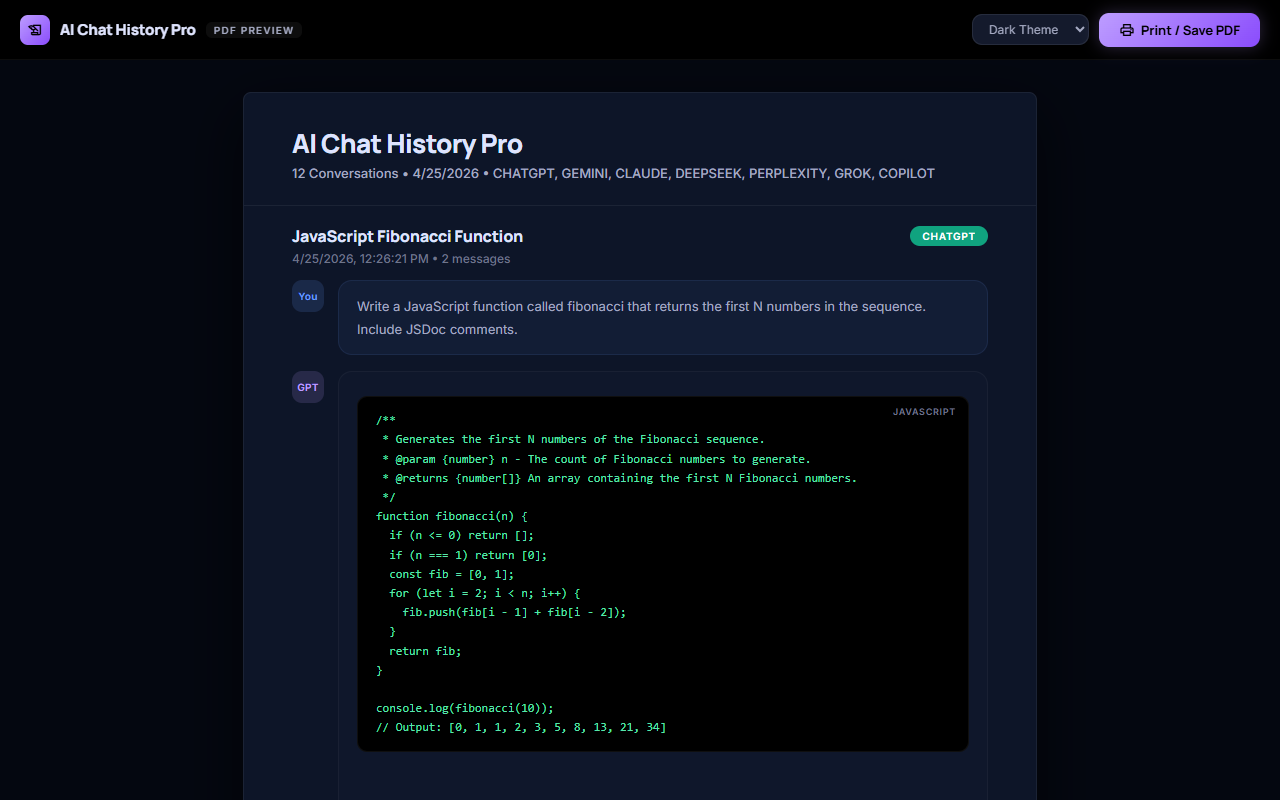
Эта страница пошагово описывает экспорт бесед ChatGPT в CSV: когда использовать именно этот формат, какие шаги требуются и как выглядит результат. Ниже также перечислены все платформы, которые поддерживает Be Mimos, и все форматы, в которые можно экспортировать, чтобы вы не были ограничены одной комбинацией после начала сохранения бесед.
Руководство по выбору CSV
CSV подходит, когда ценность беседы заключается в её структурированных, построчных данных — а не в тексте — и конечный пункт назначения — таблица или конвейер данных, а не документ.
Эта страница сосредоточена на CSV для ChatGPT, поэтому ниже‑приведённое руководство касается того, когда стоит выбрать именно этот формат, а не другой, а не того, стоит ли сохранять беседы ChatGPT вообще.
Экспортируйте несколько сохранённых бесед ИИ в CSV, затем используйте формулы таблицы или сводные таблицы, чтобы сравнить провайдеров, даты или темы сразу во всех них.
Эта страница генерируется из реестра фактов продукта, поэтому она привязана к поддерживаемым провайдерам, поддерживаемым форматам и правилам конфиденциальности.
Цель не просто один раз скачать файл. Это создать поисковый, переиспользуемый слой памяти для вашей AI‑работы, где экспорт CSV — лишь один из вариантов вывода, а не единственный способ получить ценность от сохранённой беседы.
Chat content stays local-first and is not uploaded to Be Mimos servers. That means the export step is just reformatting a copy you already have, not a new upload to a third-party service.
Find the saved conversation from your AI history before choosing CSV -- useful here for pulling structured data (lists, comparisons, extracted facts) out of a conversation into a spreadsheet -- instead of scrolling back through the original chat to locate it.
A Redact toggle can apply PII redaction tags across selected export formats. Review the redacted output before sharing it externally, the same way you would review any exported document.
Once a conversation is saved, switching from CSV to a different export format later does not require redoing any of the original work — the saved copy stays in your history and can be re-exported on demand.
Тот же локальный процесс захвата и экспорта, описанный выше, работает на каждой поддерживаемой платформе, а не только на той, о которой эта страница.
conversations are captured and saved automatically, ready for search or export whenever you need them.
chats are saved the moment you have them, with export available whenever you go looking for the conversation again.
every conversation is stored locally as it happens, so export is one click away instead of a copy-paste job.
conversations are captured and saved automatically, ready for search or export whenever you need them.
chats are saved the moment you have them, with export available whenever you go looking for the conversation again.
every conversation is stored locally as it happens, so export is one click away instead of a copy-paste job.
conversations are captured and saved automatically, ready for search or export whenever you need them.
chats are saved the moment you have them, with export available whenever you go looking for the conversation again.
every conversation is stored locally as it happens, so research archive is one click away instead of a copy-paste job.
conversations are captured and saved automatically, ready for search or export whenever you need them.
chats are saved the moment you have them, with export available whenever you go looking for the conversation again.
Сохранённая беседа не привязана к одному формату экспорта. Ниже перечислены остальные поддерживаемые форматы и их практическое назначение.
Markdown is the practical choice when the conversation needs to remain readable as plain text while preserving headings, lists, links, and code-friendly structure.
PDF is the strongest fit for a stable reading copy that can be shared, printed, attached to a record, or reviewed without requiring the recipient to edit the conversation.
Word or DOCX is useful when the conversation is only the starting point and the next step is editing, commenting, rewriting, or combining the answer with an existing document.
HTML is useful when the exported conversation should be opened in a browser, inspected as a web document, or used as the starting point for a private knowledge page.
JSON is the format to consider when the conversation must be handled as structured data for scripts, analysis, backup inspection, migration, or a custom processing workflow.
XLSX (Excel) is CSV's richer sibling — useful when the same structured, row-based conversation data needs real spreadsheet features like multiple sheets, column formatting, or formulas, not just raw values.
ZIP export is the practical choice when you need to move more than one conversation, or a conversation plus its attachments, in a single download instead of exporting each item individually.
Image export turns a conversation (or a specific answer) into a visual snapshot — the right choice when the goal is sharing something to look at, not a file to edit or reprocess.
Exporting to Google Docs is the right move when the next step is collaborative editing, commenting, or sharing inside Google Workspace, rather than working from a local file.
Plain text strips everything down to the words themselves — the most universal, dependency-free format for when you just need the content, with no formatting, markup, or file-type compatibility concerns.
ShareGPT format is a structured conversation-turn export built for fine-tuning or evaluating conversational AI models — not for reading, but for feeding into a training or evaluation pipeline.
Alpaca format restructures a conversation into instruction/input/output triples — the standard shape used for instruction-tuning AI models, not for casual reading.
Tavern format packages a conversation as a character-card-style chat log, built for AI roleplay and companion-chat applications rather than general document use.
Ooba format targets Oobabooga's text-generation-webui — useful when you're running or fine-tuning models locally and want a saved conversation available as chat history inside that specific tool.
Начните с формата, который вам нужен сейчас, а затем оставьте ту же сохранённую беседу доступной для других рабочих процессов.
Be Mimos поддерживает экспорт сохранённых AI‑бесед в CSV. Используйте его с поддерживаемыми беседами ChatGPT, захваченными расширением.
Нет. Публичная позиция конфиденциальности для генерируемых страниц — локальный‑первый: содержимое чата не загружается на серверы Be Mimos.
Да. Реестр фактов продукта включает PDF, DOCX, Markdown, HTML, JSON, CSV, XLSX, ZIP, изображение, Google Docs и форматы для обучения ML — см. полный список ниже.
Обычно нет. CSV предназначен для структурированных табличных данных с множеством строк — отдельную беседу лучше читать в Markdown, PDF или простом тексте. CSV наиболее полезен, когда вы сравниваете или анализируете множество сохранённых бесед одновременно.
Нет — CSV представляет собой простые табличные данные без форматирования rich‑text. Блоки кода, жирный/курсивный текст и изображения преобразуются в простой текст внутри ячейки.
Доступные планы: Free, Pro Monthly (4.99), Pro Yearly (39.99), Pro Lifetime (99.95). Экспорт CSV работает на основе той же основы сохранённой истории во всех планах.
Нет. Пользователи могут искать сохранённые AI‑беседы по поддерживаемым провайдерам. Найдите её по ключевому слову или дате, затем экспортируйте напрямую.
Источники говорят, что аналитики контента чатов нет и не производится майнинг данных бесед.
Источники говорят, что рекламного трекинга нет и нет сторонних рекламных cookie.